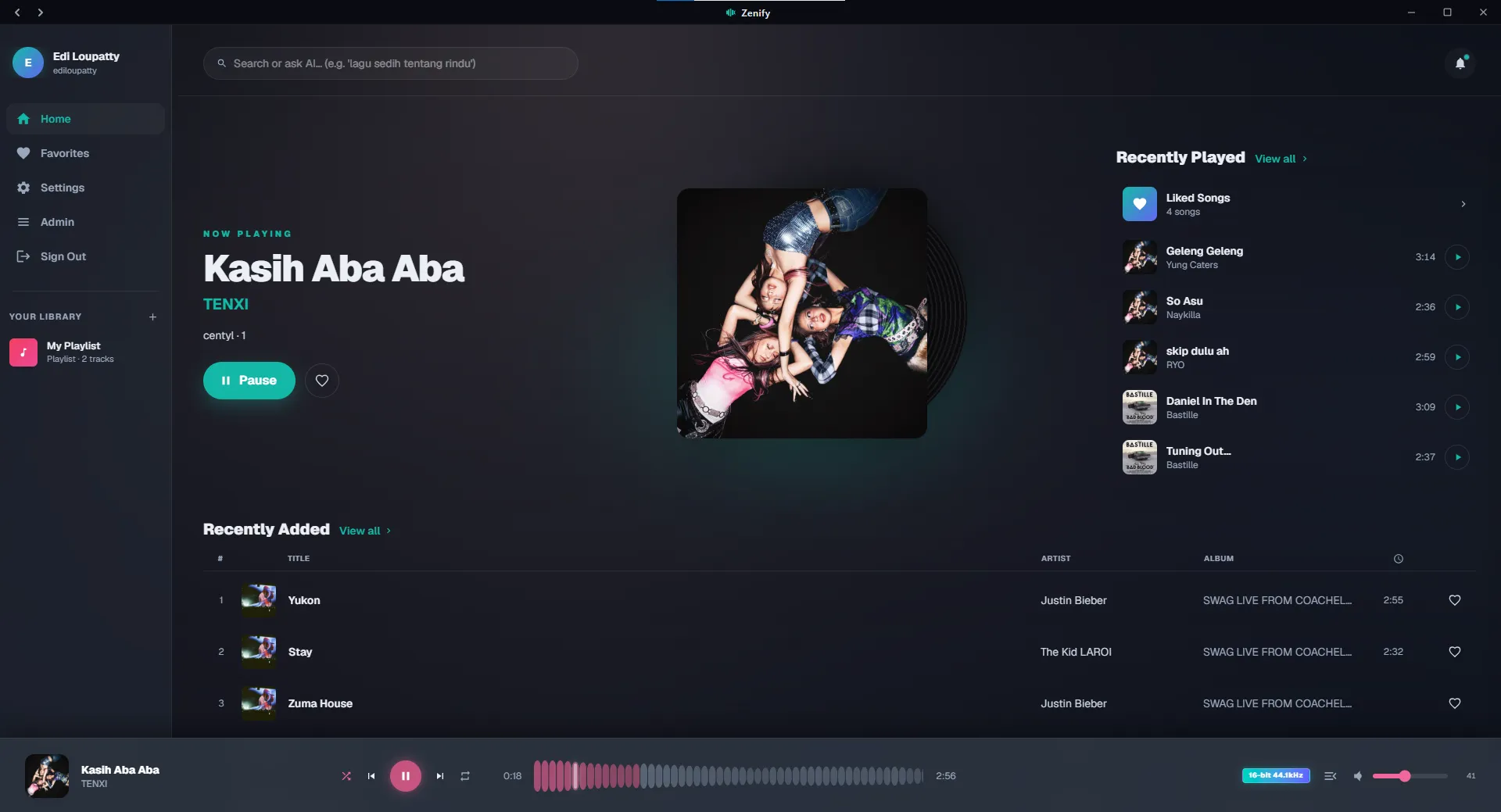
A minimal music player for Windows
MUSIC,REIMAGINED.
Zenify is a lightweight desktop music player that helps you organize, play, and enjoy your music beautifully.
Windows 10 or later•Free to use
Everything inside
Every feature, nothing hidden.
01
Playback
- A full-screen player, a compact bottom bar, and a queue you can drag to reorder
- Smart shuffle that weights the next song by genre, mood and how much you play it
- Artist cooldown, genre spread and recency decay, so a shuffle never turns monotonous
- A clean progress bar you can scrub, in the bottom bar and full-screen alike
- Crossfade between tracks, on by default and stepped aside in Direct Mode
- Repeat off / all / one, and a Previous button that walks real history
- Sleep timer — 15, 30, 45, 60 minutes, or stop at the end of the track
- Keyboard control: space, seek and skip with the arrows, M to mute
- Volume, queue and position survive a reload
- Share any song as a link that opens Zenify and plays it
- Cover art tints the player, and bleeds a whisper of colour into the sidebar and header
- Duplicates are collapsed out of the queue automatically
02
Lyrics
- Time-synced lyrics that scroll line by line
- Matched automatically, and guarded by duration so you never get another song's words
- Nudge the offset when a file runs early or late
- Plain lyrics as a fallback when no synced version exists
03
Audio Quality
- Lossless FLAC, WAV and AIFF played straight through, with no re-encoding
- Choose your stream: lossless, 320 kbps or 128 kbps
- A Hi-Res badge showing the real bit depth and sample rate
- The badge never lies — stream a transcode and it says so
- Click the badge to switch quality right where you are looking
04
Bit-Perfect Output
- Direct Mode sends the original file down an untouched path — no Web Audio graph in the way
- In the desktop app, Direct Mode hands the audio to a native Go engine on WASAPI, not the browser
- Exclusive Mode takes sole ownership of the DAC, with resampling switched off
- The device is opened at the file's own sample rate, so the DAC's rate follows the track
- A live readout in Settings: exclusive or shared, plus the bit depth and kHz being fed
- Volume locks at 100% while Direct Mode is on, because nothing may touch the samples
- Anything the native engine cannot decode falls back to the browser, so nothing stops playing
05
Library & Discovery
- Browse by song, album or artist
- Artist pages with a photo, bio, popular tracks and full discography
- Daily Mixes built from what you actually listen to
- A Discover row of random picks you can reshuffle whenever you want something else
- Favorites, recently played, and play counts
- Playlists — create them, add to them, move tracks between them, delete them
- Instant fuzzy search across the whole library
- AI search: describe a mood in plain language and get songs back
06
Offline & PWA
- Install it as an app — no store, no wrapper
- Songs and covers you play are cached for offline listening, up to 2 GB
- The app shell and its data are cached too, not only the audio
- The desktop app keeps its own native cache and warms up the next track before you reach it
- See exactly what is cached, and clear it in one tap
- Keeps playing when the network drops
07
Account & Privacy
- Email sign-up and login, with hashed passwords
- Your favorites, playlists and history belong to your account alone
- Edit your profile and change your password
- Delete your account, and everything in it, for real
08
Performance & Feel
- Lite mode drops the heavy glass blur automatically on weaker machines
- A reduced-motion toggle for when animation is too much
- Skeleton loading everywhere, and long lists render incrementally
- Sidebar on desktop, bottom navigation on mobile
09
Windows Desktop App
- A native shell (Go + WebView2) wrapped around the same player
- A native audio engine underneath it, so Direct Mode never goes through the browser
- Discord Rich Presence — “Listening to Zenify”, with cover art, audio quality and a live progress bar
- A button on the Rich Presence card that opens the song straight in Zenify
- Hardware media keys for play, pause and skip
- A system tray icon: closing the window only hides it, the music keeps going
- Taskbar thumbnail controls and a play/pause badge on the icon
- A mini player — a 360×132 card that stays on top, with its own progress bar
- Track-change notifications while the window is in the background
- Starts with Windows, runs as a single instance, ships as a one-click installer
10
Phone Remote
- Zenify Remote, an Android app that drives the player on your laptop
- Previous, play / pause and next from your pocket, Spotify-Connect style
- Search the library on your phone and start the song on the laptop
- The phone never plays the audio — it only sends commands and reads what is playing
- One login with your Zenify account, and a token that survives a server restart
- Stale taps expire instead of firing all at once when the laptop comes back
11
Admin & Library Tools
- Drag a whole folder in to upload — tags, covers and durations are read for you
- Files go from the browser straight to storage, so a big lossless album is not too large to upload
- Edit any track's metadata, or delete it from storage and database at once
- Set album covers, artist photos and artist bios by hand
- Backfill missing covers from iTunes and Deezer, and artist photos from Deezer
- Recover missing release years at the source instead of showing a wrong one
- Read bit depth and sample rate back out of the files to feed the Hi-Res badge
- Compress every stored cover, and re-clean messy filenames in bulk
- The 320 and 128 kbps variants are transcoded by a cloud job, not your own connection
- A Go uploader CLI for bulk imports, with de-duplication and retries